Spotting a Phishing Attempt
What You Need to Know
How to Spot a Phishing Attempt
Phishing, a security threat that is never far away.
- During a phishing attack, a scammer disguises their email to look like a legitimate message from a colleague or company in an attempt to trick you.
- The goal of the phishing email is to have you click on a link or open an attachment that will ask you for sensitive or confidential information.
- Phishing emails often:
- Ask for confidential personal information or credentials.
- Threaten immediate penalties for not following their instructions.
- Ask you to reply to an address that isn't associated with SJSU.
- Provide a link that appears to be an SJSU link, but connects to a different website when it opens in your browser.
- Attempt to direct you to other communication mediums (SMS, Whatsapp)
What You Need to Do
Sign up for DuoTwo-Factor Authentication (2FA)
- Duo 2FA helps keep your account safe.
- It helps protect you when somebody attempts to access your account through Okta single sign-on or other Duo-integrated apps (such as a VPN client).
- Visit our Multi-Factor Authentication page for more information.
Impersonation Alerts
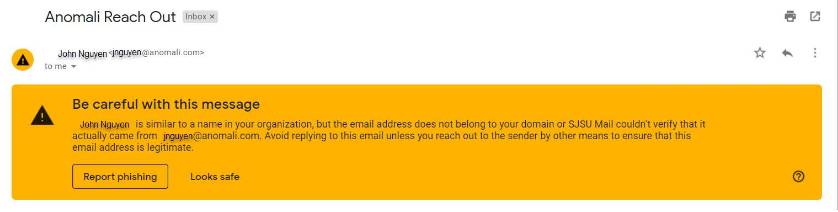
- Impersonation alerts automatically help remind you to be vigilant about suspicious emails.
- They are available on the Gmail website and in the Gmail apps for iOS and Android.
- Impersonation alerts work best when you’re using your SJSU email account for university-related communication.
Stay Vigilant
- The single best way to protect yourself is to stay vigilant and use common sense.
- Often phishers will impersonate figures of higher authority, like your boss, your teacher, or the head of your organization..... but if you ask yourself, “When’s the last time the President emailed me directly?” and the answer is “Never,” that should raise a red flag.
- Bad grammar, poor punctuation, misspelled words, and funny looking email addresses should also raise red flags.
- If you see these kinds of suspicious emails, or have any concerns at all, its better to be safe than sorry! Use the Report Phishing feature in Gmail.
What Happens if You Don’t Act
Falling victim to a phishing attack has a massively damaging effect on productivity, data loss, and reputational damage. Please stay vigilant!
Additional Resources
Education yourself about Phishing Schemes
Phishing Targeting Student Email Accounts
The United States Department of Education Federal Student Aid office has identified a malicious phishing campaign that may lead to potential fraud with student refunds and aid distributions. Be vigilant when opening emails from unknown or suspicious senders.
SJSU does NOT Use Email for the Following
SJSU does not send automated messages asking for your username and password. Nor will SJSU ask you to "renew" your MFA authentication.
SJSU does not request passwords using unsecured web pages or non-university web pages. All web password requests should be at an address that starts with https://(note the letter 's') and that includes sjsu.edu/ in the server name. Please check the URL address line in your browser for mismatches or fraudulent typos when you open a web page.
SJSU does not send automated system warning messages that require immediate response to avoid immediate penalties. SJSU automated system warnings ideally provide a reasonable time in which to respond, and will tell you how many days or weeks in which you have to respond.
SJSU does not implement automatic notification tools without informing the IT Service Desk and Desktop Support Technicians.
Phishing Awareness Program
One of the most effective ways for attackers to gain unauthorized access to an organization is through phishing emails.
If such an email lands in one of our inboxes, you may be a click away from compromising San José State University's security.
To help prevent phishing attacks, the Office of Information Security has implemented a Phishing Awareness Program for the Campus Community.
Program Highlights
As part of this new program, you will periodically receive simulated phishing emails that imitate real attacks. These emails are designed to give you a realistic experience in a safe and controlled environment that does not put the university at risk for a security breach. You will become familiar and more resilient to tactics used in real phishing attacks.
While there is no penalty if you fail to recognize one of the simulation emails, we will provide you with 30 to 60-second videos and other educational material that will help you to recognize phishing emails in the future.
As the program progresses you should be able to better spot phishing attacks, both at home and in the workplace.
If you have any questions about this training program, please contact: Information Security Office at security@sjsu.edu or call (408) 924-1530.
Report Phishing Emails
Although your first instinct might be to delete or ignore suspicious emails, please report them. If you ever suspect an email to be a phishing attack, use the "Report Phishing" and "Report Spam" buttons inside Google. If you think you have been compromised, email the Information Security Office at security@sjsu.edu or call (408) 924-1530. If you've been targeted by a phisher, chances are your coworkers have been too. By reporting suspicious emails, you can keep our campus safer.
You can also report phishing scams to the federal government using this address: spam@uce.gov.
Phishing and Spam Resources
These links provide useful information about phishing:
Email and Web scams: How to Help Protect Yourself
SonicWALL Phishing IQ Test offers a fun, informative quiz to test how well you distinguish between email schemes and legitimate email.
Spartan Google Tips
IT offers several Spartan Google Tips about phishing and spam: